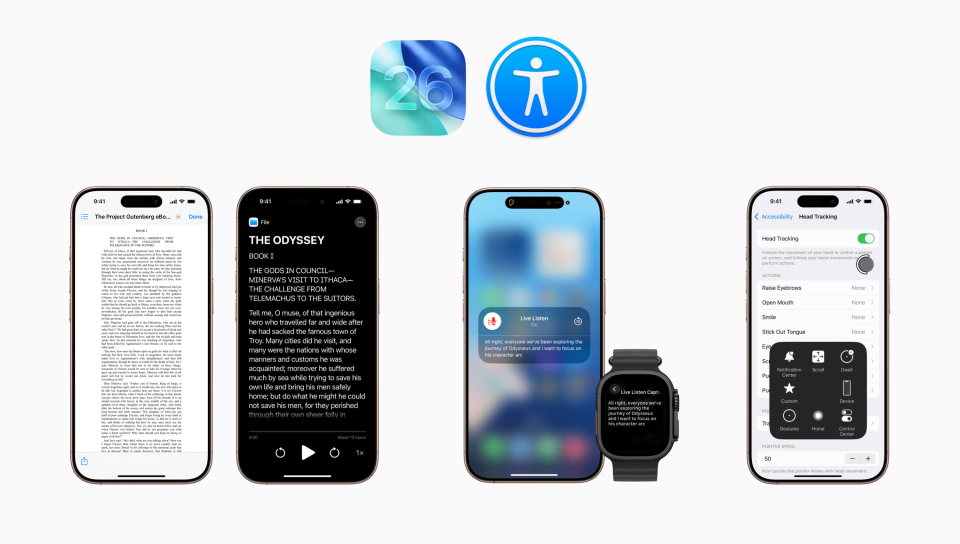
Apple’s latest iPhone software update, iOS 26, isn’t just about looks, but also about inclusion.
This year’s update brings some of the most impressive accessibility upgrades yet, helping more people use their devices comfortably and confidently. From clearer visuals to smarter captions and even a new “Liquid Glass” design you can fine-tune, iOS 26 gives users more control than ever.
In this article, we’ll look at some of the most helpful new accessibility features and how to turn them on. Let’s get started!
Taming the “Liquid Glass” Look
The most talked-about feature in iOS 26 is the new Liquid Glass interface. It creates a smooth, dynamic effect that makes menus and windows shimmer and blend with the wallpaper beneath, giving the impression of glass that flows like liquid. It’s stunning, but for some users, especially those sensitive to motion or glare, it can be too fluid.
If the shimmer or transparency feels distracting, here’s how to tone it down:
- Open Settings › Accessibility › Display & Text Size
- Turn on Reduce Transparency to add darker, more solid backgrounds behind menus and icons.
- Turn on Increase Contrast for sharper text and outlines.
- Open Settings › Accessibility › Motion
- Turn on Reduce Motion to minimize the “melting” or “floating” transitions of Liquid Glass.
Although there’s no full “off” switch for Liquid Glass, these adjustments make it calmer without losing the new design’s polish.
A Cleaner Way to Read
If cluttered layouts or tiny text make reading difficult, the new Accessibility Reader can help. It takes the text from any screen and presents it in a clean, easy-to-read format. In the reader, you can adjust the font size, spacing, and background color for comfort – or have the text read aloud. Best of all, it works across your entire iPhone, so you can open it from any app.
To use Accessibility Reader:
- Open Settings › Accessibility › Read & Speak › Accessibility Reader.
- Turn it on and explore options for font size, spacing, and background color.
- To launch it from any app, use the Accessibility Shortcut (triple-press the side button and select Accessibility Reader) or add the Accessibility Reader control to Control Center.
Live Captions on Apple Watch
Staying part of the conversation just got easier. The new Live Captions for Live Listen feature on Apple Watch builds on your iPhone’s ability to act as a remote microphone. As your iPhone picks up sound from a conversation, call, or video, your Apple Watch shows real-time captions of what’s being said – perfect for discreetly following along in noisy environments, during calls, or without needing to turn up the volume. Your Watch can also act as a remote control, letting you pause, resume, or rewind the Live Listen session with a quick tap.
To use this new iPhone-Watch combo accessibility feature, make sure your Apple Watch is running watchOS 26. You can find Apple’s step-by-step setup guide here.
Using Your iPhone Hands-free
New in iOS 26, Head Tracking lets you control your iPhone using gentle head movements and facial expressions. The front camera follows your motion and moves an on-screen pointer as you do. When you hold your head steady over an item, it’s selected – just like a tap.
To try it out:
Go to Settings › Accessibility › Head Tracking, then turn it on. From there, you can fine-tune options such as the pointer’s speed and sensitivity, or assign actions – like Open Menu or Camera – to facial expressions such as smiling or scrunching your nose for quicker control.
Pro Tip: For best results, keep your iPhone about 18 inches from your face in good lighting.
Extra Accessibility Features to Explore
iOS 26 includes many other accessibility updates designed to make your iPhone easier and more personal to use. Here are other highlights worth exploring:
- Braille Access: Turns your iPhone or iPad into a full braille device. You can connect a braille display or use on-screen braille input to read, type, and navigate entirely by touch.
- Accessibility Nutrition Labels: Found in the App Store, these labels show which accessibility features an app supports before you download it – such as VoiceOver, captions, or dynamic text.
- Setup Transfer for Accessibility: When setting up a new iPhone or iPad, your accessibility settings (like text size, contrast, or hearing options) now transfer automatically, saving time and ensuring a familiar experience from the start.
Want to learn more about iOS 26 or smartphones in general? Visit seniorplanet.org/smartphones to watch our four-part lecture series on iOS 26 and explore upcoming classes and resources on smartphones.
Got a tech question that just cannot wait? Join the Everything Tech and Ask a Tech Expert groups on the Senior Planet Community platform to ask any tech questions you might have and discuss technology trends with other like-minded individuals. You can also call our free Senior Planet Tech Hotline at 888-713-3495.
Your Turn
Have you tried any of the new accessibility features yet? Which settings made your iPhone or iPad easier to use? Share your answer in the comment section below.
 Techspert Jonathan is Senior Planet’s Sr. Digital Community Relations and Product Specialist and a former Senior Planet San Antonio technology trainer. He is also an iOS developer with a background in Information Systems and Cyber Security.
Have a tech question that’s got you stumped? Send your tech questions to Techspert Jonathan using THIS FORM. He’ll be tackling one question a month from readers.
The content on the Senior Planet website is intended strictly for general informational purposes and does not constitute an endorsement or warranty regarding privacy, security, app permissions, or changes in the app’s terms of service. Please scrutinize each app’s privacy policy, terms of use, data collection or other permissions before downloading or using the app.




COMMENTS
3 responses to “Ask The Techspert: What’s New in Accessibility on iOS 26”
Y wife and I both have iPhone 12 models. We used to have bold set for our keypads but since the upgrade to iOS 26 are unable to enable the option
I feel the new glass feature is challenging for seniors with poor vision like myself.
Glass is not a feature. It is something from a bad dream which should be deleted.
Sign Up for Newsletters
There’s always a lot going on in the Senior Planet universe. Get our newsletters to make sure you never miss a thing!
Sign Up Now
Join Senior Planet Community
Senior Planet Community is our social media platform designed specifically for older adult users. Engage in thought-provoking discussions, make new friends, and share resources all on a safe and ad-free platform.
Join the Conversation Today
Upcoming Online Classes
Calendar of Events
Start your week off right with a preview of the week's upcoming programs and a guided meditation session!
Start your day with a short morning stretch!
Registration required.
Where can you find cute pets, news, how-to videos, and more? YouTube, of course! Join us for an intro to YouTube.
Learn how the Nextdoor app can help you connect to neighbors and stay in the know in your neighborhood.
Get your heart pumping during this fun, high-energy workout!
This program is cancelled.
Start your day with a short morning stretch!
Like to know what's happening? Come learn about X (formerly Twitter)!
Ready to get your business noticed online? From SEO to five-star reviews, discover practical strategies to put your business on the digital map!
Follow various cues to develop body alignment and breath awareness.
Start your day with a short morning stretch!
Learn about platforms that make website building a breeze!
Are you paying for TV channels you don't watch? Learn why people are "cutting the cord" and using streaming services instead!
Learn what Podcasts are and where to find them!
Make money while decluttering with online marketplaces!
Start your week off right with a preview of the week's upcoming programs and a guided meditation session!
Start your day with a short morning stretch!
Registration required.
Ready to ditch the filling cabinet and store your documents virtually? Join this lecture on Digital Vaults to learn how!
Tired of juggling paperwork, deadlines, and day-to-day chaos? Discover the user-friendly software tools that can bring clarity, control, and peace of mind to your business.
Make money while decluttering with online marketplaces!
Activate the joints and muscles and increase mental focus during this exercise class.
Start your day with a short morning stretch!
Tour world famous museums from the comfort of your home!
Registration required.
Come learn about QR codes, augmented reality apps, and more!
Want to use AI on your phone? Come explore Google Gemini’s mobile features, from drafting messages to managing privacy.
Start your day with a short morning stretch!
Will your digital content and social media pages live on forever? Come learn about your digital legacy options!
Join Senior Planet and our tour guides from Discover Live for a virtual visit to Croatia!
Can you photoshop that? Come learn the possibilities with photo editing tools!
Get your heart pumping during this fun, high-energy workout!
Activate the joints and muscles to become limber and increase balance during this exercise class.
Start your day with a short morning stretch!
Concerned about viruses and malware? Attend this lecture to learn how to keep your device safe!
Don't want to pay for software? Learn how Google's free tools have you covered.
Curious about your family's history? Fill in the gaps using digital genealogy resources!
Start your day with a short morning stretch!
Be your own DJ with help from Spotify.
¡Venga a chatear con ChatGPT y aprenda sobre IA!
Relax your mind and strengthen your body with this gentle exercise class.
Learn how to stay safe while you surf the web!
Join this session for a fun workout that will boost your strength, flexibility, and mobility!
Need a vacation? Learn about popular websites and apps for booking vacation rentals.
Be your own travel agent with help from these online travel sites!
Leave the dictionary at home and start using digital tools that can translate on the go.
Start your week off right with a preview of the week's upcoming programs and a guided meditation session!
Start your day with a short morning stretch!
Learn tips and tricks to using your smartphone while staying safe!
Registration required.
A simple plan is better than no plan! Get to know a few free and low-cost resources that make it simple to plan your estate.
Interested in taking your cash only business into the digital age? Learn what digital payments are and how to choose among them in this lecture!
Activate the joints and muscles and increase mental focus during this exercise class.
Start your day with a short morning stretch!
Learn about platforms that make website building a breeze!
Don't want to go out? Learn about some popular apps to get food delivered to your front door.
Registration required.
Curious about AI? Come learn the basics, including how it works and considerations to keep in mind.
Start your day with a short morning stretch!
Don't overpay for internet. Learn about programs offering low-cost home internet that can help save you money.
Registration required.
Where can you find cute pets, news, how-to videos, and more? YouTube, of course! Join us for an intro to YouTube.
Learn what Podcasts are and where to find them!
Get your heart pumping during this fun, high-energy workout!
Activate the joints and muscles to become limber and increase balance during this exercise class.
Start your day with a short morning stretch!
Registration required.
Are you scam savvy? Come to this lecture to learn about fraud and scams and how to protect yourself against them.
Explore ways that tech can help you save money and manage your finances!
Learn how the Nextdoor app can help you connect to neighbors and stay in the know in your neighborhood.
Start your day with a short morning stretch!
See who you are talking to with video chat apps!
Aprenda cómo aprovechar al máximo ChatGPT y otros software de IA.
Relax your mind and strengthen your body with this gentle exercise class.
Registration required.
Goodbye floppy discs and USB drives! Learn about cloud storage options that save your files remotely.
Activate the joints and muscles and increase mental focus during this exercise class.
Start your day with a short morning stretch!
Registration required.
Make money while decluttering with online marketplaces!
Discover what you can do with online and mobile banking!
Learn how to make the most out of ChatGPT and other AI software.
Start your day with a short morning stretch!
No car? No problem! Use these apps to help you get around!
Who are Alexa and Siri? Come to this lecture to find out!
Will your digital content and social media pages live on forever? Come learn about your digital legacy options!
Get your heart pumping during this fun, high-energy workout!
Activate the joints and muscles to become limber and increase balance during this exercise class.
Start your day with a short morning stretch!
Say cheese! Learn more about your smartphone's camera.
Registration required.
Faster is not always better! Come learn about home internet options so you only pay for what you need.
Still paying for texting? Use these free apps instead.
Start your day with a short morning stretch!
¡Todo el mundo habla de IA! Asista a esta clase para ver cómo la IA es parte de la vida cotidiana.
Learn how to stay safe while you surf the web!
Join this session to turn your business idea into reality and learn about planning, research, and funding options.
Relax your mind and strengthen your body with this gentle exercise class.
Join this session for a fun workout that will boost your strength, flexibility, and mobility!
Learn how digital coupon tools can help you save money!
Can't find it in the store? Learn about shopping online!
You CAN leave home without your wallet! Learn about popular digital wallets and their many uses.
Start your week off right with a preview of the week's upcoming programs and a guided meditation session!
Start your day with a short morning stretch!
Registration required.
Concerned about privacy? Unsure about accepting cookies? Come learn about some essential privacy tips!
Interested in taking your cash only business into the digital age? Learn what digital payments are and how to choose among them in this lecture!
Get your heart pumping during this fun, high-energy workout!
Activate the joints and muscles and increase mental focus during this exercise class.
Start your day with a short morning stretch!
Ready to get your business noticed online? From SEO to five-star reviews, discover practical strategies to put your business on the digital map!
Goodbye floppy discs and USB drives! Learn about cloud storage options that save your files remotely.
Registration required.
Everyone is talking about AI! Come to this class to see how AI is part of everyday life.
Start your day with a short morning stretch!
Registration required.
Tired of resetting your password all the time? Join this lecture to discover password alternatives and different ways to manage your passwords.
Learn how the Nextdoor app can help you connect to neighbors and stay in the know in your neighborhood.
Get your heart pumping during this fun, high-energy workout!
Come learn about all that Senior Planet has to offer online!
Activate the joints and muscles to become limber and increase balance during this exercise class.
Start your day with a short morning stretch!
Goodbye Copper, Hello Fiber!
Registration required.
Overwhelmed by the choices of a new computer? We'll help you simplify so you can decide!
Are you paying for TV channels you don't watch? Learn why people are "cutting the cord" and using streaming services instead!
Start your day with a short morning stretch!
¿Podemos realmente creer lo que vemos? ¡Venga a esta clase para acostumbrarse a reconocer la IA!
Love the great outdoors? Come learn how smartphone apps can enhance your outdoor hobbies!
Relax your mind and strengthen your body with this gentle exercise class.
Registration required.
Learn how to use emojis, GIFs, and more to quickly say what you mean!
Will your digital content and social media pages live on forever? Come learn about your digital legacy options!
A simple plan is better than no plan! Get to know a few free and low-cost resources that make it simple to plan your estate.
Ready to ditch the filling cabinet and store your documents virtually? Join this lecture on Digital Vaults to learn how!
Good Morning, Senior Planet!
Morning Stretch
YouTube
Introduction to Nextdoor
Fit Fusion Workout
CANCELLED – Stronger Bones
Morning Stretch
Intro to X (formerly Twitter)
Getting Your Small Business Online
Chair Yoga
Morning Stretch
Website Builders at a Glance
Streaming & Smart TVs
Podcasts at a Glance
Intro to Selling Online
Good Morning, Senior Planet!
Morning Stretch
Digital Vaults
Essential Tech for Running Your Small Business
Intro to Selling Online
Stronger Bones
Morning Stretch
Virtual Museum Tours
Smartphone Camera Uses Beyond Photography
Using the Google Gemini App Demo
Morning Stretch
Digital Legacy at a Glance
Virtual Tour: Split, Croatia
Intro to Photo Editing Tools
Fit Fusion Workout
Balance/Strength
Morning Stretch
Anti-Virus & Malware Removal Programs At a Glance
Google Workspace
Digital Genealogy Tools
Morning Stretch
Spotify
Introducción a la IA
Taijiquan (Tai Chi)
Protecting Your Personal Info Online
Saturday Morning Boost: A Fun and Functional Workout
Introduction to Booking Vacation Stays Online
Online Travel Sites
Intro to Translation Tools
Good Morning, Senior Planet!
Morning Stretch
Safe & Savvy Smartphone Habits
Introduction to Estate Planning Resources & Tools
Digital Payments & Your Small Business
Stronger Bones
Morning Stretch
Website Builders at a Glance
Food Delivery Apps
Intro to AI
Morning Stretch
Affordable Home Internet
YouTube
Podcasts at a Glance
Fit Fusion Workout
Balance/Strength
Morning Stretch
Understanding Fraud & Scams
CANCELLED – Saving Money with Tech
Introduction to Nextdoor
Morning Stretch
CANCELLED – Video Chat
Introducción a chatear con IA
Taijiquan (Tai Chi)
Cloud Storage
Stronger Bones
Morning Stretch
Intro to Selling Online
Banking and Finance Apps at a Glance
Intro to Chatting with AI
Morning Stretch
Ridesharing Apps
Voice Assistants
Digital Legacy at a Glance
Fit Fusion Workout
Balance/Strength
Morning Stretch
Intro to Smartphone Photography
Understanding Internet Plans
Messaging Apps
Morning Stretch
Usos cotidianos de la IA
Protecting Your Personal Info Online
Turning a Business Idea Into Reality
Taijiquan (Tai Chi)
Saturday Morning Boost: A Fun and Functional Workout
Digital Coupon Tools
Online Shopping
Introduction to Digital Wallets
Good Morning, Senior Planet!
Morning Stretch
Intro to Managing Your Privacy
Digital Payments & Your Small Business
Fit Fusion Workout
Stronger Bones
Morning Stretch
Getting Your Small Business Online
Cloud Storage
Everyday Uses of AI
Morning Stretch
Passwords, Passkeys, and More
Introduction to Nextdoor
Fit Fusion Workout
Virtual Orientation to Senior Planet
Balance/Strength
Morning Stretch
Staying in Touch as Landlines Change
How to Choose a New Computer
Streaming & Smart TVs
Morning Stretch
¿Es eso IA?
Outdoor Adventure Apps
Taijiquan (Tai Chi)
Emojis, GIFs, and more!
Digital Legacy at a Glance
Introduction to Estate Planning Resources & Tools
Digital Vaults
Recent Articles
Recent Comments